

Tracing your agent
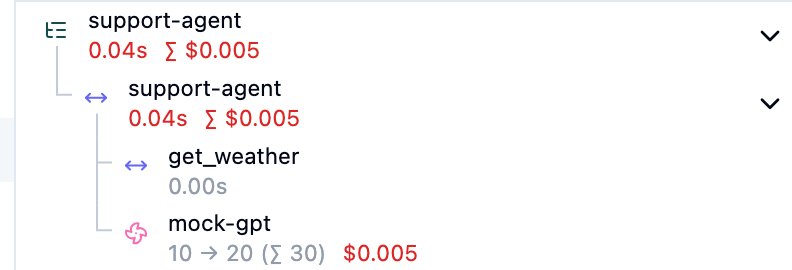
Forgebench records every model call. Add a few lines to your agent and each run becomes one trace. It shows the agent, the tools it called, and each model call under the step that made it.
You need an API key and the SDK installed. See the Quickstart.
1. Mark the agent and its tools
Wrap your agent's entry point and each tool with observe. Each call records
its input, output, duration and any error. Model calls made inside the agent
nest under it on their own.
from forgebench import Forgebench, observe

fb = Forgebench()  # reads FORGEBENCH_API_KEY and FORGEBENCH_BASE_URL

@observe(as_type="tool")
def get_weather(city: str) -> dict:
  return {"city": city, "temp_c": 18}

@observe(as_type="agent", name="support-agent")
def answer(question: str) -> str:
  weather = get_weather("San Francisco")
  reply = fb.chat.completions.create(
      model="mock-gpt",
      messages=[{"role": "user", "content": f"{question} Weather: {weather}"}],
  )
  return reply.choices[0].message.content

print(answer("Do I need an umbrella today?"))
fb.flush()  # send before a short script exits
import { Forgebench, observe } from "@seedlinglabs/forgebench-sdk";
const fb = new Forgebench({
apiKey: process.env.FORGEBENCH_API_KEY!,
baseUrl: process.env.FORGEBENCH_BASE_URL,
});
const getWeather = observe(
async (city: string) => ({ city, temp_c: 18 }),
{ name: "get_weather", asType: "tool" },
);
const answer = observe(
async (question: string) => {
const weather = await getWeather("San Francisco");
const reply = await fb.chat.create({
model: "mock-gpt",
messages: [{ role: "user", content: `${question} Weather: ${JSON.stringify(weather)}` }],
});
return reply.choices[0]?.message.content;
},
{ name: "support-agent", asType: "agent" },
);
console.log(await answer("Do I need an umbrella today?"));
await fb.flush(); // send before a short script exitsimport ai.forgebench.ChatCompletionRequest;
import ai.forgebench.ChatMessage;
import ai.forgebench.Forgebench;
import ai.forgebench.tracing.Observation;
import ai.forgebench.tracing.ObservationType;
import ai.forgebench.tracing.Tracing;
import ai.forgebench.types.ChatCompletion;
import java.util.Map;
Forgebench fb = Forgebench.builder().build(); // reads FORGEBENCH_API_KEY and FORGEBENCH_BASE_URL
Tracing tracing = fb.tracing();
try (Observation agent = tracing.startActiveObservation(ObservationType.AGENT, "support-agent")) {
Map<String, Object> weather = tracing.observe(ObservationType.TOOL, "get_weather",
Map.of("city", "San Francisco"),
() -> Map.of("city", "San Francisco", "temp_c", 18));
ChatCompletion reply = fb.chat().completions().create(ChatCompletionRequest.builder()
.model("mock-gpt")
.addMessage(ChatMessage.user("Do I need an umbrella today? Weather: " + weather))
.build());
agent.output(reply.getContent());
System.out.println(reply.getContent());
}
fb.flush(); // send before a short program exits# Ids: 32 hex characters for the trace, 16 for each step.
TRACE_ID=$(openssl rand -hex 16)
AGENT_ID=$(openssl rand -hex 8)
TOOL_ID=$(openssl rand -hex 8)
NOW=$(date -u +%Y-%m-%dT%H:%M:%SZ)
# The model call. X-Parent-Observation nests it under the agent step.
curl -s https://api.forgebench.ai/v1/chat/completions \
-H "Authorization: Bearer $FORGEBENCH_API_KEY" \
-H "Content-Type: application/json" \
-H "X-Parent-Observation: $AGENT_ID" \
-d @- <<JSON
{"model": "mock-gpt", "trace_id": "$TRACE_ID",
"messages": [{"role": "user", "content": "Do I need an umbrella today? Weather: 18C"}]}
JSON
# The agent and tool steps, and the trace's name.
curl -s https://api.forgebench.ai/v1/observations/batch \
-H "Authorization: Bearer $FORGEBENCH_API_KEY" \
-H "Content-Type: application/json" \
-d @- <<JSON
{"observations": [
{"id": "$AGENT_ID", "trace_id": "$TRACE_ID", "type": "agent", "name": "support-agent",
"input": "Do I need an umbrella today?", "start_time": "$NOW", "end_time": "$NOW"},
{"id": "$TOOL_ID", "trace_id": "$TRACE_ID", "parent_observation_id": "$AGENT_ID",
"type": "tool", "name": "get_weather", "input": {"city": "San Francisco"},
"output": {"city": "San Francisco", "temp_c": 18}, "start_time": "$NOW", "end_time": "$NOW"}
],
"traces": [{"id": "$TRACE_ID", "name": "support-agent"}]}
JSON2. Run it
Run the program as usual. The SDK sends steps in the background with your
existing API key; there's nothing else to install or grant. In a short
script, flush makes sure everything is sent before it exits.
3. Open the trace
In the console, open Traces and select the newest support-agent trace.
You'll see:
support-agent, the agent's run, at the topget_weatherunder it, with its input and output- the
mock-gptmodel call under it, with tokens and cost
Opening Traces needs the admin role or the View observability permission. See Who sees which traces.