

Quickstart
Create an API key, send your first request through Forgebench, and find the record it left.
1. Create an API key
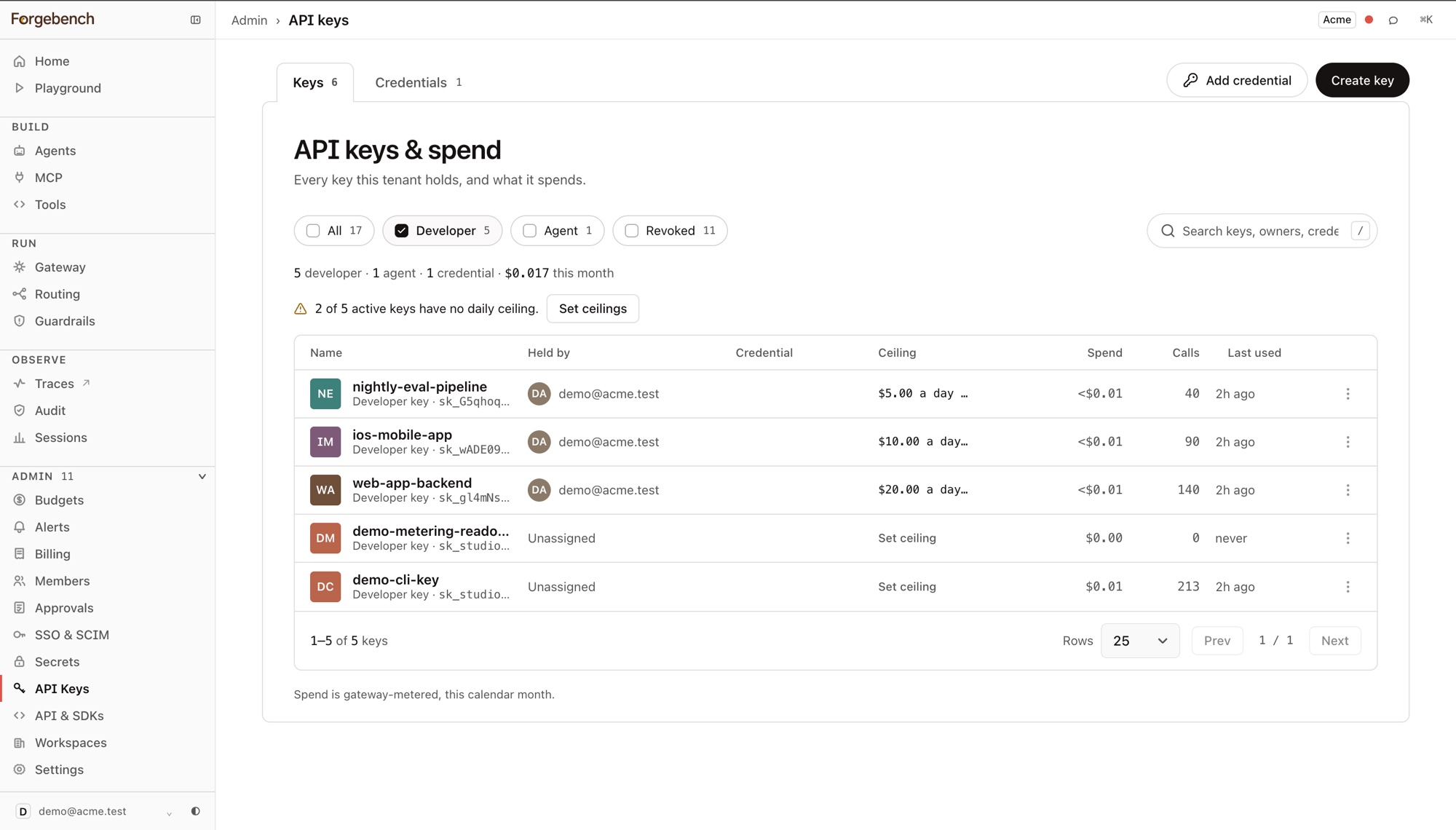
Open API Keys
In the sidebar, expand Admin and choose API Keys.
Add a provider key first, if you have not
Developer keys use a provider credential (your OpenAI, Anthropic or Gemini key). Forgebench stores it encrypted and adds it at call time, so your code never holds it.
Mint a developer key
Give it a name, set a daily and monthly cap, and tick the models it may reach. You can edit both later.
Copy the secret now
The
sk_...secret is shown once, at creation, and can't be shown again.
2. Install an SDK
pip install "git+https://github.com/seedlinglabs/forgebench-sdk.git#subdirectory=sdk-py"npm install https://github.com/seedlinglabs/forgebench-sdk/releases/latest/download/forgebench-sdk-ts.tgz<repositories>
<repository><id>jitpack.io</id><url>https://jitpack.io</url></repository>
</repositories>
<dependency>
<groupId>com.github.seedlinglabs</groupId>
<artifactId>forgebench-sdk</artifactId>
<version>main-SNAPSHOT</version>
</dependency>3. Send the call
Point the client at your workspace's API URL and pass the key. mock-gpt is a
built-in test model that costs almost nothing. Use it to test the setup before
you spend real provider money.
from forgebench import Forgebench

# api_key defaults to $FORGEBENCH_API_KEY, base_url to $FORGEBENCH_BASE_URL
client = Forgebench(api_key="sk_...", base_url="https://api.forgebench.ai")

resp = client.chat.completions.create(
  model="mock-gpt",
  messages=[{"role": "user", "content": "Prove the governed path works."}],
)

print(resp.choices[0].message.content)
print(resp.usage.total_tokens)
import { Forgebench } from "@seedlinglabs/forgebench-sdk";
const forgebench = new Forgebench({
baseUrl: "https://api.forgebench.ai",
apiKey: process.env.FORGEBENCH_API_KEY!,
});
const res = await forgebench.chat.create({
model: "mock-gpt",
messages: [{ role: "user", content: "Prove the governed path works." }],
});
console.log(res.choices[0]?.message.content);
console.log("tokens:", res.usage.total_tokens);import ai.forgebench.ChatCompletionRequest;
import ai.forgebench.ChatMessage;
import ai.forgebench.Forgebench;
import ai.forgebench.types.ChatCompletion;
// apiKey defaults to $FORGEBENCH_API_KEY, baseUrl to $FORGEBENCH_BASE_URL
Forgebench client = Forgebench.builder()
.apiKey("sk_...")
.baseUrl("https://api.forgebench.ai")
.build();
ChatCompletion resp = client.chat().completions().create(ChatCompletionRequest.builder()
.model("mock-gpt")
.addMessage(ChatMessage.user("Prove the governed path works."))
.build());
System.out.println(resp.getChoices().get(0).getMessage().getContent());
System.out.println(resp.getUsage().getTotalTokens());curl -X POST https://api.forgebench.ai/v1/chat/completions \
-H "Authorization: Bearer sk_..." \
-H "Content-Type: application/json" \
-d '{
"model": "mock-gpt",
"messages": [{"role": "user", "content": "Prove the governed path works."}]
}'4. Read the response
The response is OpenAI-compatible, with one extra field, trace_id:
{
  "id": "chatcmpl-a5a25bcd-3632-4b60-9964-a0828565cdbc",
  "object": "chat.completion",
  "created": 1789101061,
  "model": "mock-gpt",
  "choices": [
    {
      "index": 0,
      "message": { "role": "assistant", "content": "Hello from the Forgebench mock model …" },
      "finish_reason": "stop"
    }
  ],
  "usage": { "prompt_tokens": 10, "completion_tokens": 20, "total_tokens": 30 },
  "trace_id": "600902b2bd484291b7433f10ac4465f1"
}
trace_id links this response to its audit entry, metering record and trace.
5. Find the record it left
The call is recorded in three places:
What happened, span by span, with latency and token counts.
AuditThe tamper-evident record of the call and who made it.
BudgetsWhat it cost, and what remains under the cap.
What happens when it is refused
Budgets are checked before the call is forwarded, so a refused call never
reaches the provider and costs nothing. Over the cap, Forgebench returns 402:
{
  "detail": {
    "code": "budget_exceeded",
    "message": "monthly budget exceeded",
    "limit_usd": "0.000100",
    "spent_usd": "0.000385",
    "attempted_cost_usd": "0.005000"
  }
}
The body shows the cap, the spend so far, and what this call would have cost.
The Python SDK raises this as BudgetExceededError. Refused calls are logged
with their reason; see Errors and refusals.
Troubleshooting
| You see | Cause |
|---|---|
401 unknown api key | The key is wrong, was rotated, or was revoked. Mint or rotate one on API Keys. |
402 budget_exceeded | The cap was reached. Raise it on Budgets, or wait for the window to roll over. |
403 on a call that used to work | The key's scopes or model allowlist do not cover what you asked for. Check them in the key's Manage dialog. |