

Agents
The agent inventory lists every governed agent: who owns it, its state, whether it has a spend ceiling, and when it was last seen.
The lifecycle
An agent is in one of four states:
| State | Meaning |
|---|---|
| registered | Has a credential but has never made a call. If it stays here after you expected traffic, the credential probably never reached the caller or the deploy didn't ship. |
| active | Has made at least one governed call. The first call sets this automatically. |
| paused | Its calls are refused. Someone paused it, or guardrail auto-pause did when findings crossed the threshold. |
| retired | Permanently out of service. Its history is kept. |
Register an agent
Click Register on the inventory
Opens the registration dialog.
Name the agent
For example
invoice-classifier. The name appears on every inventory row and audit entry.Assign an owner (required)
The person accountable for the agent. Only admins, and roles with the
agents:assign_ownerpermission, can name someone else; anyone else registers the agent under their own name. The same rule applies when you reassign an agent later.Choose the model (required)
The model the agent runs on by default. This does not restrict the credential: like every Forgebench key, it can call any catalog model unless you set an allowlist. To lock it, pass
allowed_modelswhen registering through the API; the dialog doesn't offer this yet. Change the default model later from the agent's page.Describe what it does
Optional. The tool-suggestion pass uses it, and colleagues read it when deciding whether the agent can be turned off.
Add feature tags
Optional, comma-separated (for example
checkout, invoicing, pii-sensitive). Spend, refusals and findings roll up by feature as well as by agent.Click Register & issue credential
Forgebench creates the agent and its credential. The credential is shown once; copy it before closing the dialog. The agent starts as registered, with no tool access.
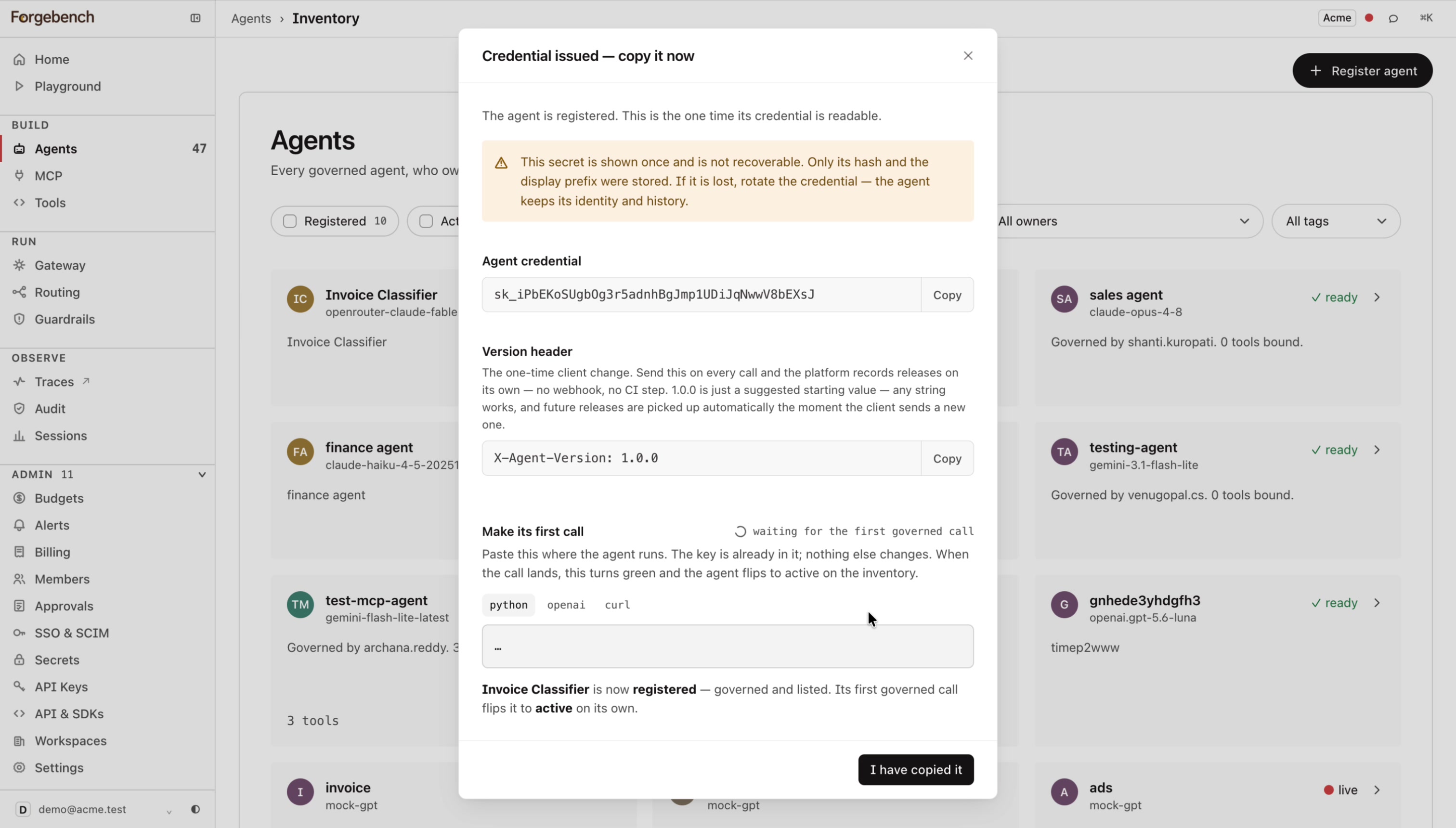
The same screen shows a ready-to-copy call in curl, Python or the OpenAI SDK shape, with the key filled in and the X-Agent-Version header to send. An indicator changes when the agent's first call arrives.
Set its spend ceiling
A new agent has no cap of its own; only the workspace budget applies. Set a per-agent monthly cap in Budgets.
Go to Budgets → Per-agent caps
Each agent is listed with its monthly cap, spend so far and remaining balance.
Click Edit on the agent's row
Opens
Edit monthly cap: <agent name>.Set the monthly limit (USD)
Leave it blank for no per-agent cap. Without one, the agent can use the whole workspace budget.
Save
The cap applies immediately, alongside the workspace budget.
Call from your code
The credential from registration is the agent's API key. Store it where your service reads secrets. Calls with it are attributed to the agent in traces, audit and budgets.
import os
from forgebench import Forgebench, ForgebenchError

client = Forgebench(api_key=os.environ["FORGEBENCH_AGENT_KEY"],
               base_url="https://api.forgebench.ai")

try:
  resp = client.chat.completions.create(
      model="gpt-4o",
      messages=[{"role": "user", "content": "..."}],
  )
except ForgebenchError as e:
  log.error("call failed: %s", e)
import { Forgebench, ForgebenchError } from "@seedlinglabs/forgebench-sdk";
const forgebench = new Forgebench({
baseUrl: "https://api.forgebench.ai",
apiKey: process.env.FORGEBENCH_AGENT_KEY!,
});
try {
const res = await forgebench.chat.create({
model: "gpt-4o",
messages: [{ role: "user", content: "..." }],
});
} catch (e) {
if (e instanceof ForgebenchError) {
console.error("call failed", e);
} else {
throw e;
}
}import ai.forgebench.ChatCompletionRequest;
import ai.forgebench.ChatMessage;
import ai.forgebench.Forgebench;
import ai.forgebench.errors.ForgebenchException;
import ai.forgebench.types.ChatCompletion;
Forgebench client = Forgebench.builder()
.apiKey(System.getenv("FORGEBENCH_AGENT_KEY"))
.baseUrl("https://api.forgebench.ai")
.build();
try {
ChatCompletion resp = client.chat().completions().create(ChatCompletionRequest.builder()
.model("gpt-4o")
.addMessage(ChatMessage.user("..."))
.build());
} catch (ForgebenchException e) {
log.error("call failed: {}", e.toString());
}export FORGEBENCH_AGENT_KEY=sk_... # the agent's own credential
curl -X POST https://api.forgebench.ai/v1/chat/completions \
-H "Authorization: Bearer $FORGEBENCH_AGENT_KEY" \
-H "Content-Type: application/json" \
-d '{
"model": "gpt-4o",
"messages": [{"role": "user", "content": "..."}]
}'If the credential has allowed_models set (through the API, at registration
or later by editing its policy), a call for any other model gets
403 model_not_allowed. Without it, any catalog model works.
Tool bindings and guardrail scanning need no code changes. You configure them for the agent in Tool Registry, MCP and Guardrail findings.
Handle agent-specific errors
Besides the general codes in Errors and refusals, two errors are specific to agents:
| Status | Cause | Body |
|---|---|---|
401 | The agent is paused or retired, so its key is
unauthorized. The key stops working as soon as the agent is paused, by a person or by
guardrail auto-pause. | {"detail": "agent is paused"} |
403 | model_not_allowed: the call named a model not in the
credential's allowed_models. | {"detail":{"error":"model_not_allowed","model":...,"allowed_models":[...]}} |
A paused agent and a bad key both return 401. Only the body text tells them
apart: "agent is paused" versus "unknown api key". Check it before assuming
the key needs rotating.
For model_not_allowed, e.code is None: the identifier is in
detail.error, not detail.code (unlike tool_not_authorized and
mcp_tool_not_authorized). Branch on e.body["detail"]["error"]:
import os
from forgebench import Forgebench, AuthenticationError, PermissionDeniedError

client = Forgebench(api_key=os.environ["FORGEBENCH_AGENT_KEY"],
               base_url="https://api.forgebench.ai")

try:
  resp = client.chat.completions.create(model="gpt-4o", messages=[{"role": "user", "content": "..."}])
except AuthenticationError as e:
  log.error("agent auth failed: %s", e)
except PermissionDeniedError as e:
  detail = (e.body or {}).get("detail", {})
  if detail.get("error") == "model_not_allowed":
      log.error("model %s not allowed; allowed: %s", detail["model"], detail["allowed_models"])
  else:
      log.error("not authorized: %s", e.body)
import { Forgebench, AuthenticationError, PermissionDeniedError } from "@seedlinglabs/forgebench-sdk";
const forgebench = new Forgebench({
baseUrl: "https://api.forgebench.ai",
apiKey: process.env.FORGEBENCH_AGENT_KEY!,
});
try {
const res = await forgebench.chat.create({ model: "gpt-4o", messages: [{ role: "user", content: "..." }] });
} catch (e) {
if (e instanceof AuthenticationError) {
console.error("agent auth failed", e.body);
} else if (e instanceof PermissionDeniedError) {
const detail = (e.body as { detail?: Record<string, unknown> })?.detail ?? {};
if (detail.error === "model_not_allowed") {
console.error(`model ${detail.model} not allowed; allowed: ${detail.allowed_models}`);
} else {
console.error("not authorized", e.body);
}
} else {
throw e;
}
}import ai.forgebench.ChatCompletionRequest;
import ai.forgebench.ChatMessage;
import ai.forgebench.Forgebench;
import ai.forgebench.errors.AuthenticationException;
import ai.forgebench.errors.PermissionDeniedException;
import ai.forgebench.types.ChatCompletion;
import java.util.Map;
Forgebench client = Forgebench.builder()
.apiKey(System.getenv("FORGEBENCH_AGENT_KEY"))
.baseUrl("https://api.forgebench.ai")
.build();
try {
ChatCompletion resp = client.chat().completions().create(ChatCompletionRequest.builder()
.model("gpt-4o").addMessage(ChatMessage.user("...")).build());
} catch (AuthenticationException e) {
log.error("agent auth failed: {}", e.toString());
} catch (PermissionDeniedException e) {
Map<?, ?> body = e.getBody() instanceof Map ? (Map<?, ?>) e.getBody() : Map.of();
Map<?, ?> detail = body.get("detail") instanceof Map ? (Map<?, ?>) body.get("detail") : Map.of();
if ("model_not_allowed".equals(detail.get("error"))) {
log.error("model {} not allowed; allowed: {}", detail.get("model"), detail.get("allowed_models"));
} else {
log.error("not authorized: {}", e.getBody());
}
}# -i prints the status line: 401 for a paused agent or a bad key, 403 for model_not_allowed
curl -i -X POST https://api.forgebench.ai/v1/chat/completions \
-H "Authorization: Bearer $FORGEBENCH_AGENT_KEY" \
-H "Content-Type: application/json" \
-d '{
"model": "gpt-4o",
"messages": [{"role": "user", "content": "..."}]
}'Inventory columns
- Owner: who to ask.
- Tags: filter the inventory by feature.
- State: one of the four agent states.
- Version: the revision serving. Changing prompt or policy makes a new one.
- Budget: whether a ceiling is set. Blank means no per-agent cap.
- Error rate: tool-call failures. A rising rate usually means a tool changed.
- Last seen: the agent's most recent call.
Agent detail
Open a row to see one agent's credential, policy, version history and recent tool activity. Start here when an agent behaves unexpectedly.
| Tab | What it shows |
|---|---|
| Overview | What the agent may do: its MCP and Registry tool access and its model, plus its most recent calls and bound tools. |
| Tools | Two allowlists: MCP allowlist (see MCP) and Registry (see Tool Registry). With nothing bound in either, the agent can call no tools. |
| Credentials | Rotate the credential if it is lost or compromised; the agent keeps its identity and history. An agent has one live key at a time, so the old key stops working immediately. Revealing a credential through a claim link for an agent with a live key also rotates it. |
| Versions | Built from the X-Agent-Version header on each call. Empty until the agent sends that header. |
| Calls, Tool activity, Guardrails | Traces, tool-call history and guardrail findings for this agent only. |
Any string works as a version, and a new value shows up as soon as the client sends it. Set the header once when you construct the client:
from forgebench import Forgebench

client = Forgebench(
  api_key="sk_...",
  base_url="https://api.forgebench.ai",
  default_headers={"X-Agent-Version": "1.4.0"},
)

resp = client.chat.completions.create(
  model="mock-gpt",
  messages=[{"role": "user", "content": "hello from invoice-classifier"}],
)
import { Forgebench } from "@seedlinglabs/forgebench-sdk";
const forgebench = new Forgebench({
baseUrl: "https://api.forgebench.ai",
apiKey: process.env.FORGEBENCH_AGENT_KEY!,
defaultHeaders: { "X-Agent-Version": "1.4.0" },
});
const res = await forgebench.chat.create({
model: "mock-gpt",
messages: [{ role: "user", content: "hello from invoice-classifier" }],
});import ai.forgebench.ChatCompletionRequest;
import ai.forgebench.ChatMessage;
import ai.forgebench.Forgebench;
import ai.forgebench.types.ChatCompletion;
Forgebench client = Forgebench.builder()
.apiKey("sk_...")
.baseUrl("https://api.forgebench.ai")
.defaultHeader("X-Agent-Version", "1.4.0")
.build();
ChatCompletion resp = client.chat().completions().create(ChatCompletionRequest.builder()
.model("mock-gpt")
.addMessage(ChatMessage.user("hello from invoice-classifier"))
.build());curl -X POST https://api.forgebench.ai/v1/chat/completions \
-H "Authorization: Bearer sk_..." \
-H "X-Agent-Version: 1.4.0" \
-H "Content-Type: application/json" \
-d '{
"model": "mock-gpt",
"messages": [{"role": "user", "content": "hello from invoice-classifier"}]
}'The SDKs don't support a per-call header override. To report a different version from the same process, create a separate client.
The right-hand rail shows State, Ownership, Limits (model and per-agent monthly cap), Activity this cycle, Bindings, Feature tags and Lifecycle, where you retire the agent.