

Traces
A trace records one governed call: what was sent, what came back, how long each step took, and what it cost. Forgebench traces every governed call automatically, with nothing to install or configure.
Who sees which traces
| Who | What they see |
|---|---|
| Admins, and members whose role includes the View observability permission | Every trace in the workspace, in the full Observability view. |
| Builders | My traces: only traces of their own governed calls. A Viewer has no trace access by default. |
A trace is yours if you made the call, or if it used the key of an agent you currently own. If an agent changes owner, its traces move with it. A trace that includes someone else's calls doesn't appear in My traces. To give Builders or Viewers View observability, an admin uses a custom role.
My traces lists your traces newest first, for the last 24 hours, 7 days or 30 days (Time range). Select one to see its input, output, latency, tokens and steps.
Reading the trace list
In the full Observability view, each row is one call:
| Column | What it tells you |
|---|---|
| Timestamp | When the call was made. |
| Name | The kind of operation: a plain reply, or one step in a multi-step task. |
| Input / Output | Exactly what was sent and returned, in full. |
| Latency | How long the call took, per step, so you can find the slow one. |
| Cost and tokens | Cost and token usage, per step. |
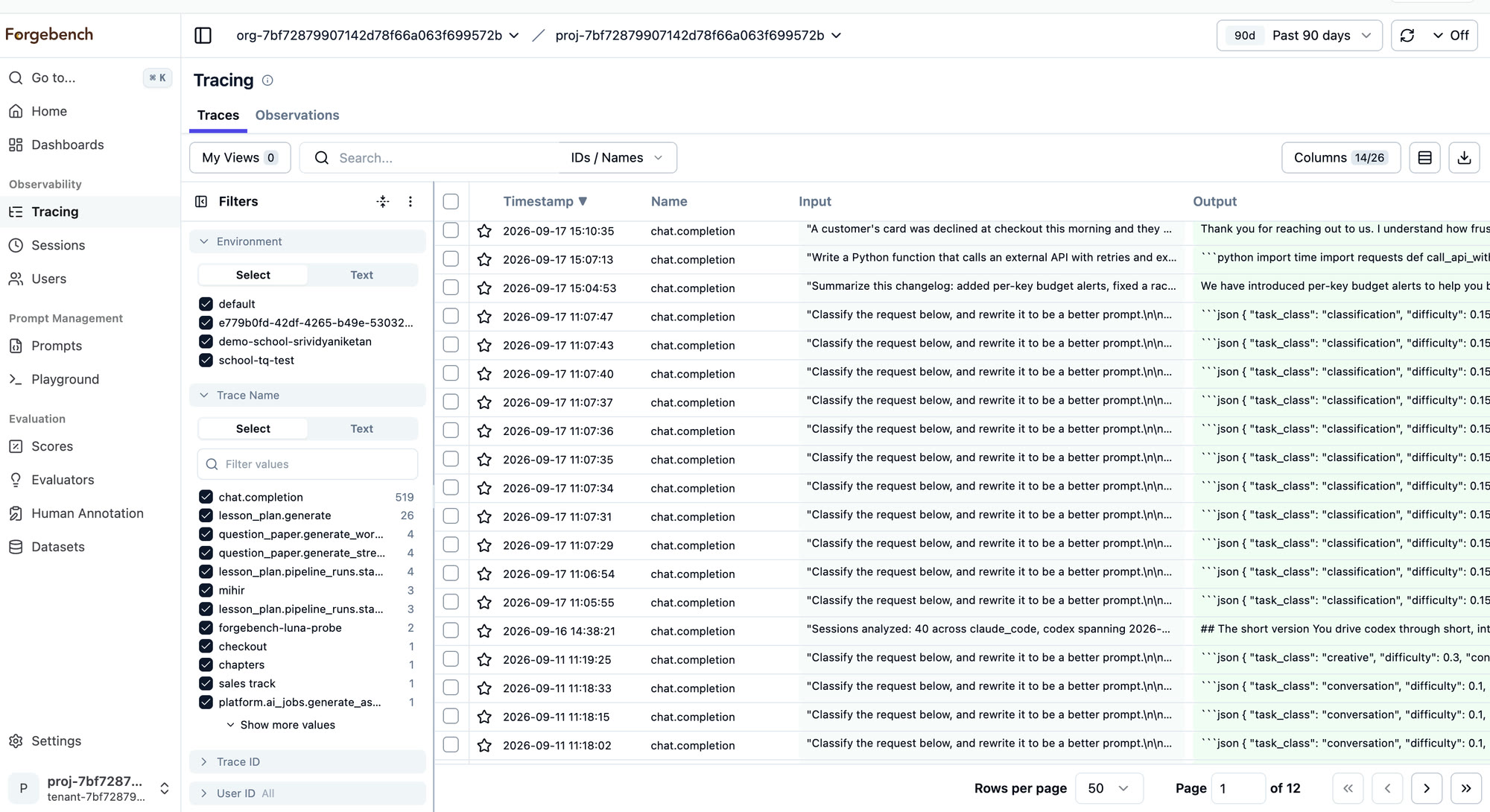
Opening a trace
Select a row to see the call's exact input and output, the user it was made for, and its cost and tokens. A multi-step call, such as a model call, a tool call and another model call, shows each step in order with the same detail.
Images show in the trace as pictures: an image sent to a model (an
image_url part) in the input, and an image a model generated in the
output. They are kept for as long as your traces are, and deleted when the
traces expire or the workspace is deleted. When a PII guardrail policy is on,
images are not stored: like an image over 20 MB, they show as a placeholder
with their type and size instead.
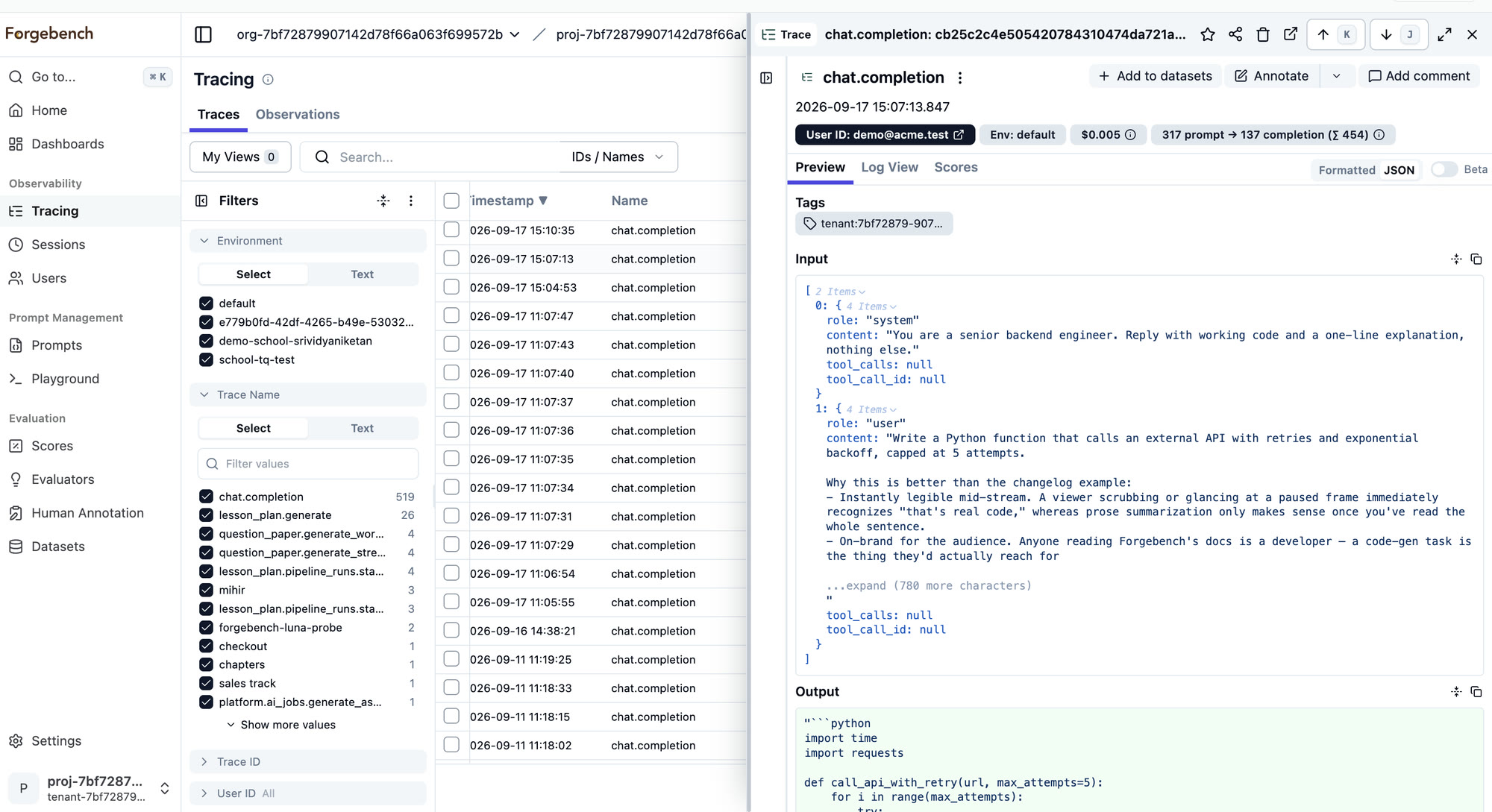
Finding a particular call
In the full Observability view:
From a response
Every Forgebench reply carries a trace identifier. Search for it to go straight to the call.
From the Playground
A Playground reply links to its trace.
By filtering
Filter by name, user, session or tag, then sort by latency or cost.
Adding your agent's own steps
Forgebench sees every model call, but not the code around it: which agent ran, which function or tool it was in, and what the tool returned. Mark those steps with the SDK to get one nested trace per run, with each model call under the step that made it. See Tracing your agent.
Grouping and labelling calls
- Sessions group related calls into one conversation. They need metadata sent with each call.
- Users group calls by the person who made them, for questions like who generates the most cost. No metadata needed.
- Prompts show the wording sent to the model, kept separately from any one call so you can review and reuse it.
Spend and audit records are written separately from traces, so a tracing delay or outage doesn't affect them.