

Routing
Routing finds a cheaper model for each agent, proven on its own traffic. It works per agent, in one of two modes:
| Shadow | Semantic | |
|---|---|---|
| What it does | Watches the agent's real calls, tests cheaper models side by side, and recommends one | Picks a model for each call from a fixed list you confirm, and serves it |
| Changes what is served | Only after an admin approves the switch | Yes, as soon as you turn it on |
| Use it to | Find the right base model for an agent, with evidence | Send each call to the model that fits its task, from models you already allow |
An agent runs one mode at a time. For retries and fallbacks when a provider is down, see Gateway.
Permissions: routing:view to open Routing; routing:evaluate or
agents:write to start or stop a Shadow window. Semantic, limits and the
routing budget are admin-only.
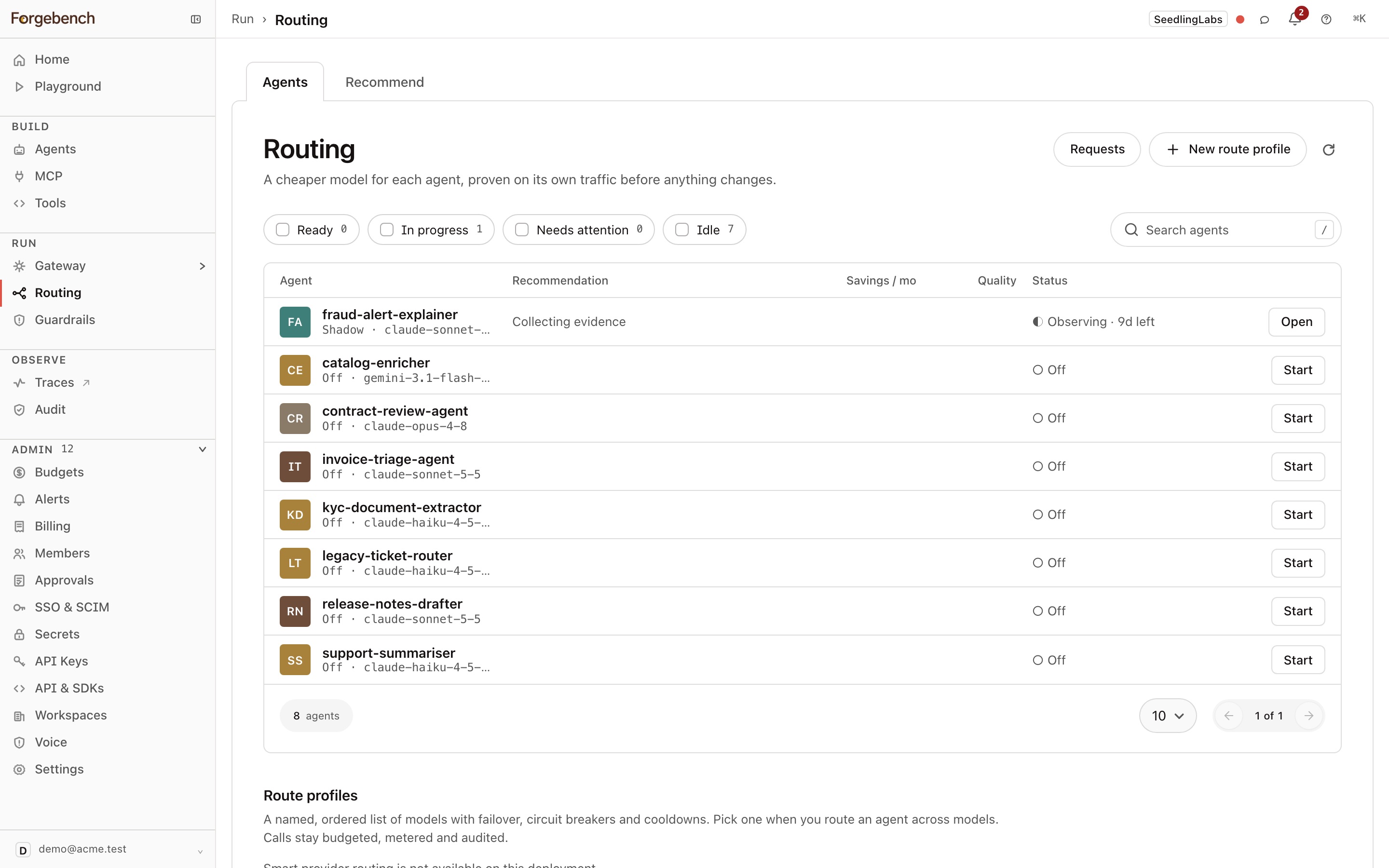
The Routing page
| Tab | What it shows |
|---|---|
| Agents | Every agent's routing state. Click a row to open that agent's routing page. |
| Recommend | The best model in the catalog for one prompt you paste, and the evidence for it. A dry run: no call is made and nothing is billed. |
Filter agents by Ready, In progress, Needs attention or Idle. Start opens the start dialog; New route profile creates a route profile.
Agent states
| State | Meaning |
|---|---|
| Off | No window running, not on Semantic. |
| Observing | A Shadow window is collecting evidence. |
| Checking the judge | The quality judge needs human labels before its verdicts count. See The quality judge. |
| Ready | A cheaper model qualified. Request approval to switch. |
| No change | Nothing cheaper held quality. The agent keeps its model. |
| Not enough traffic | Too few calls to compare anything. |
| Held back | A candidate looked good but was blocked. The page says why. |
| Awaiting approval | A switch request is with an admin. |
| Canary | The switch is live and being watched for errors. |
| Switched | The canary passed. The new model stays. |
| Rolled back | Errors rose after the switch, so it went back to the previous model. |
| Reverted: not enough traffic | The canary saw too few calls to confirm the switch, so it was undone. |
| Reverted: a key rejected the model | One of the agent's keys isn't allowed to call the new model, so the switch was undone. |
| Changed manually | Someone changed the agent's model during the canary, so routing stopped watching. |
Shadow routing
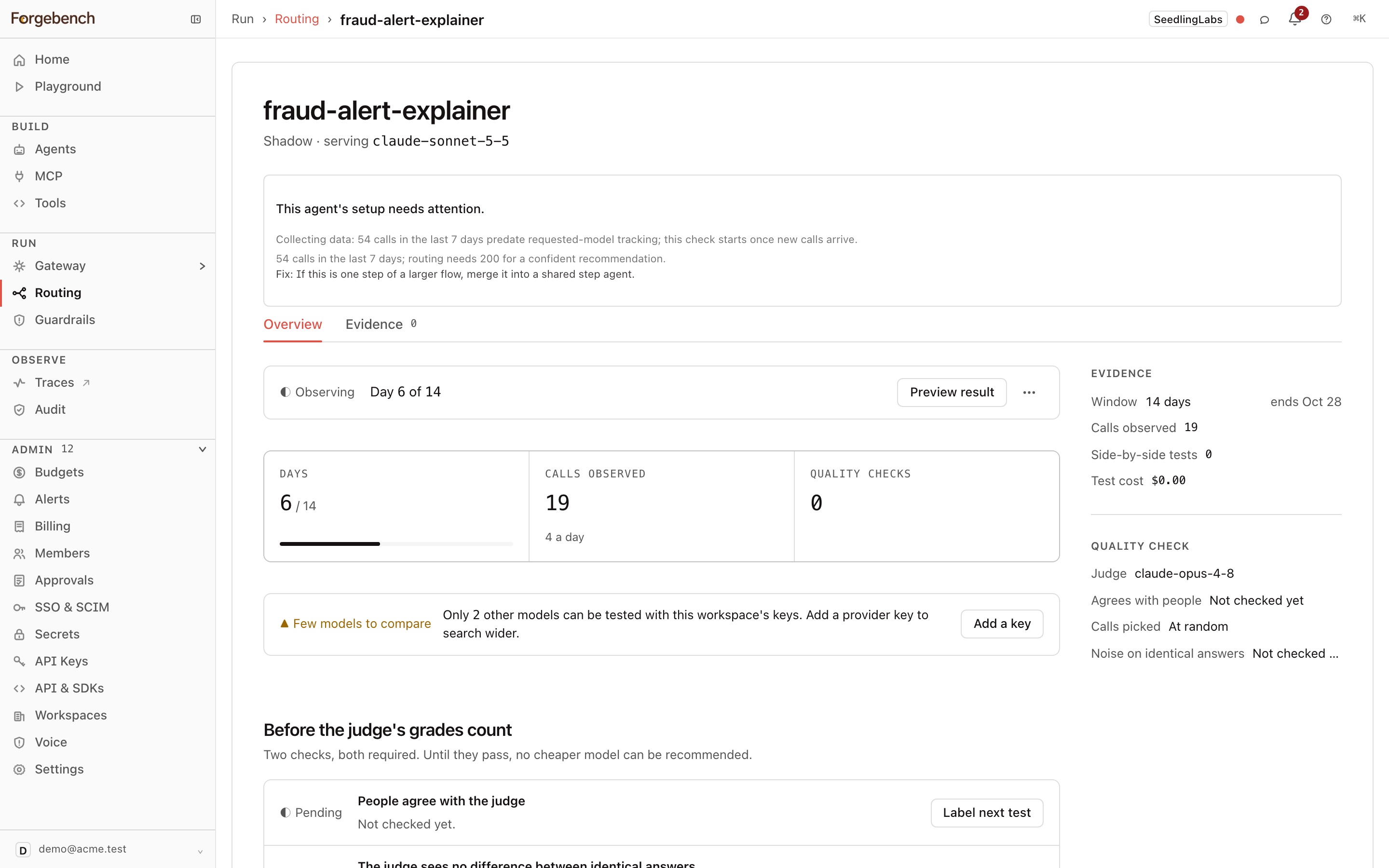
Start observing
On the agent's routing page, choose Start observing, keep Routing mode on Shadow, and set:
- How long: 7, 14 or 30 days.
- Test on: 5%, 10% or 25% of calls. These are re-sent to candidate models in the background as side-by-side tests.
- Models to test: the candidates.
- Quality judge: the model that grades the side-by-side answers.
The agent's key must allow every model you test.
Evidence builds up
Real calls are served as normal. The judge grades each sampled candidate answer against the current model's. Users never see candidate answers.
Read the result
Overview shows the decision: calls observed, models compared, what a switch would save per 30 days, the speed change, and the judge's tally ("29 of 30 at least as good"). Evidence lists every side-by-side test. Preview result computes the recommendation from what has been seen so far; Finish now, in the ⋯ menu, ends the window early.
Request approval
An admin approves the change, then it goes live as a canary.
Side-by-side tests and the judge are real, billed calls. They are paid from the agent's routing budget, never its spend cap.
The bars a switch has to clear
A candidate is recommended only if it clears all of these:
| Bar | Value |
|---|---|
| Capability | No more than 5% worse than the current model on its worst task class, not its average. |
| Quality on real answers | At least 5 judged side-by-side tests, with a conservative estimate of at least 80% "at least as good". |
| Saving | At least 10% and $0.10, after the window's own test and judge spend. |
| Errors | A candidate failing more than 15% of its side-by-side tests (over 22 or more) is dropped. |
Confidence is Low below 30 calls, Medium from 30, and High from 200. With no quality judge, no candidate can pass.
The quality judge
A judge's verdicts count only once they agree with people. When the agent is Checking the judge, use Label next test to grade side-by-side answers yourself. The judge must agree with you well over at least 20 labels, and must not favour one side on pairs that should be equal. Until then, candidates show "no change".
The canary
After approval the agent switches to the new model, and Forgebench watches its real calls for 24 hours:
- More than 10% failed calls (over at least 20): it rolls back to the previous model on its own.
- Too few calls: the watch is extended once, then the switch is reverted.
- A key that can't call the new model: the switch is reverted.
Semantic routing
Semantic sends each call to the model that best fits its task, from a list you confirm. The usual fallbacks apply.
Choose Semantic
On the agent's routing page, choose Start observing and set Routing mode to Semantic.
Pick the models
Start from a Saved route profile, or pick Models to route across yourself. Models the agent can't use are left out and named.
Confirm and turn it on
Confirm the list. The agent's key must allow every model in it. If smart routing is off for the workspace, the dialog offers to turn it on.
The agent's model becomes profile:<name>. Turn Semantic routing off
returns it to its previous model.
If the profile breaks (a model is removed, or a key no longer allows it),
calls are refused with 409 rather than sent to another model.
Route profiles
A route profile is a named, ordered list of models with failover. Call it
with model="profile:<name>", or use it as an agent's Semantic list.
A profile's strategy decides how it picks among its models: for example
priority (in order, failing over), weighted (split by the weights you
give), round-robin, cost-optimized, auto, or semantic.
One model on several provider keys
A profile can list the same model more than once, each step on a different
key for the same provider. With weighted it splits traffic between the
keys (for example 50/50); with priority it fails over from one to the
next. A 429 on one key cools down only that key, and the others keep
serving.
Each provider has one default key. An admin adds more keys under a label, with the API:
import os
import httpx

r = httpx.put(
  f"{os.environ['FORGEBENCH_BASE_URL']}/v1/secrets/providers",
  headers={"Authorization": f"Bearer {os.environ['FORGEBENCH_ADMIN_KEY']}"},
  json={"provider": "openrouter", "api_key": "sk-or-...", "label": "org-b"},
)
r.raise_for_status()
const r = await fetch(`${process.env.FORGEBENCH_BASE_URL}/v1/secrets/providers`, {
method: "PUT",
headers: {
Authorization: `Bearer ${process.env.FORGEBENCH_ADMIN_KEY}`,
"Content-Type": "application/json",
},
body: JSON.stringify({ provider: "openrouter", api_key: "sk-or-...", label: "org-b" }),
});
if (!r.ok) throw new Error(`HTTP ${r.status}: ${await r.text()}`);import com.fasterxml.jackson.databind.ObjectMapper;
import java.net.URI;
import java.net.http.HttpClient;
import java.net.http.HttpRequest;
import java.net.http.HttpResponse;
import java.util.Map;
String body = new ObjectMapper().writeValueAsString(Map.of(
"provider", "openrouter",
"api_key", "sk-or-...",
"label", "org-b"));
HttpResponse<String> r = HttpClient.newHttpClient().send(
HttpRequest.newBuilder(URI.create(System.getenv("FORGEBENCH_BASE_URL") + "/v1/secrets/providers"))
.header("Authorization", "Bearer " + System.getenv("FORGEBENCH_ADMIN_KEY"))
.header("Content-Type", "application/json")
.PUT(HttpRequest.BodyPublishers.ofString(body))
.build(),
HttpResponse.BodyHandlers.ofString());
if (r.statusCode() / 100 != 2) throw new IllegalStateException("HTTP " + r.statusCode() + ": " + r.body());curl -X PUT "$FORGEBENCH_BASE_URL/v1/secrets/providers" \
-H "Authorization: Bearer $FORGEBENCH_ADMIN_KEY" \
-H "Content-Type: application/json" \
-d '{"provider": "openrouter", "api_key": "sk-or-...", "label": "org-b"}'Then create the profile (POST /v1/route-profiles, or PUT to update one)
with a keys list, one entry per model in the same order.
null means the provider's default key:
import os
import httpx

r = httpx.post(
  f"{os.environ['FORGEBENCH_BASE_URL']}/v1/route-profiles",
  headers={"Authorization": f"Bearer {os.environ['FORGEBENCH_ADMIN_KEY']}"},
  json={
      "name": "gpt5-two-keys",
      "strategy": "weighted",
      "models": ["openrouter-gpt-5", "openrouter-gpt-5"],
      "keys": [None, "org-b"],
      "weights": [50, 50],
  },
)
r.raise_for_status()
const r = await fetch(`${process.env.FORGEBENCH_BASE_URL}/v1/route-profiles`, {
method: "POST",
headers: {
Authorization: `Bearer ${process.env.FORGEBENCH_ADMIN_KEY}`,
"Content-Type": "application/json",
},
body: JSON.stringify({
name: "gpt5-two-keys",
strategy: "weighted",
models: ["openrouter-gpt-5", "openrouter-gpt-5"],
keys: [null, "org-b"],
weights: [50, 50],
}),
});
if (!r.ok) throw new Error(`HTTP ${r.status}: ${await r.text()}`);import com.fasterxml.jackson.databind.ObjectMapper;
import java.net.URI;
import java.net.http.HttpClient;
import java.net.http.HttpRequest;
import java.net.http.HttpResponse;
import java.util.Arrays;
import java.util.List;
import java.util.Map;
String body = new ObjectMapper().writeValueAsString(Map.of(
"name", "gpt5-two-keys",
"strategy", "weighted",
"models", List.of("openrouter-gpt-5", "openrouter-gpt-5"),
"keys", Arrays.asList(null, "org-b"), // null = the provider's default key
"weights", List.of(50, 50)));
HttpResponse<String> r = HttpClient.newHttpClient().send(
HttpRequest.newBuilder(URI.create(System.getenv("FORGEBENCH_BASE_URL") + "/v1/route-profiles"))
.header("Authorization", "Bearer " + System.getenv("FORGEBENCH_ADMIN_KEY"))
.header("Content-Type", "application/json")
.POST(HttpRequest.BodyPublishers.ofString(body))
.build(),
HttpResponse.BodyHandlers.ofString());
if (r.statusCode() / 100 != 2) throw new IllegalStateException("HTTP " + r.statusCode() + ": " + r.body());curl -X POST "$FORGEBENCH_BASE_URL/v1/route-profiles" \
-H "Authorization: Bearer $FORGEBENCH_ADMIN_KEY" \
-H "Content-Type: application/json" \
-d '{
"name": "gpt5-two-keys",
"strategy": "weighted",
"models": ["openrouter-gpt-5", "openrouter-gpt-5"],
"keys": [null, "org-b"],
"weights": [50, 50]
}'Labels are 1 to 64 letters, digits, _, . or -. You can't delete a
labelled key while a profile uses it.
Routing limits
Limits narrow what routing may choose; they never widen what a key allows. Set Allowed providers for the workspace on the Routing page, and Allowed models and Allowed providers per agent on its routing page. Empty means no restriction.
Routing budget
Each agent has a Routing budget for side-by-side tests and the judge, separate from its spend cap. It never affects production traffic.
| Setting | What it does |
|---|---|
| Monthly cap (USD) | Empty uses the default. 0 means no evaluation. |
| Raise the cap for this month | Replaces the cap for the current month only. |
| Bill evaluation to | The agent's own key by default, or another Forgebench key, so that key's limits and pool apply. |
| Budget pool (optional) | Evaluation also stops when this pool's budget is used up. |
| When the budget is used up | Pause evaluation (default) or warn only. |
| Warn at | Percentage of the cap. Default 80%. |
| Pause evaluation | Stops tests and the judge now, whatever the budget. |
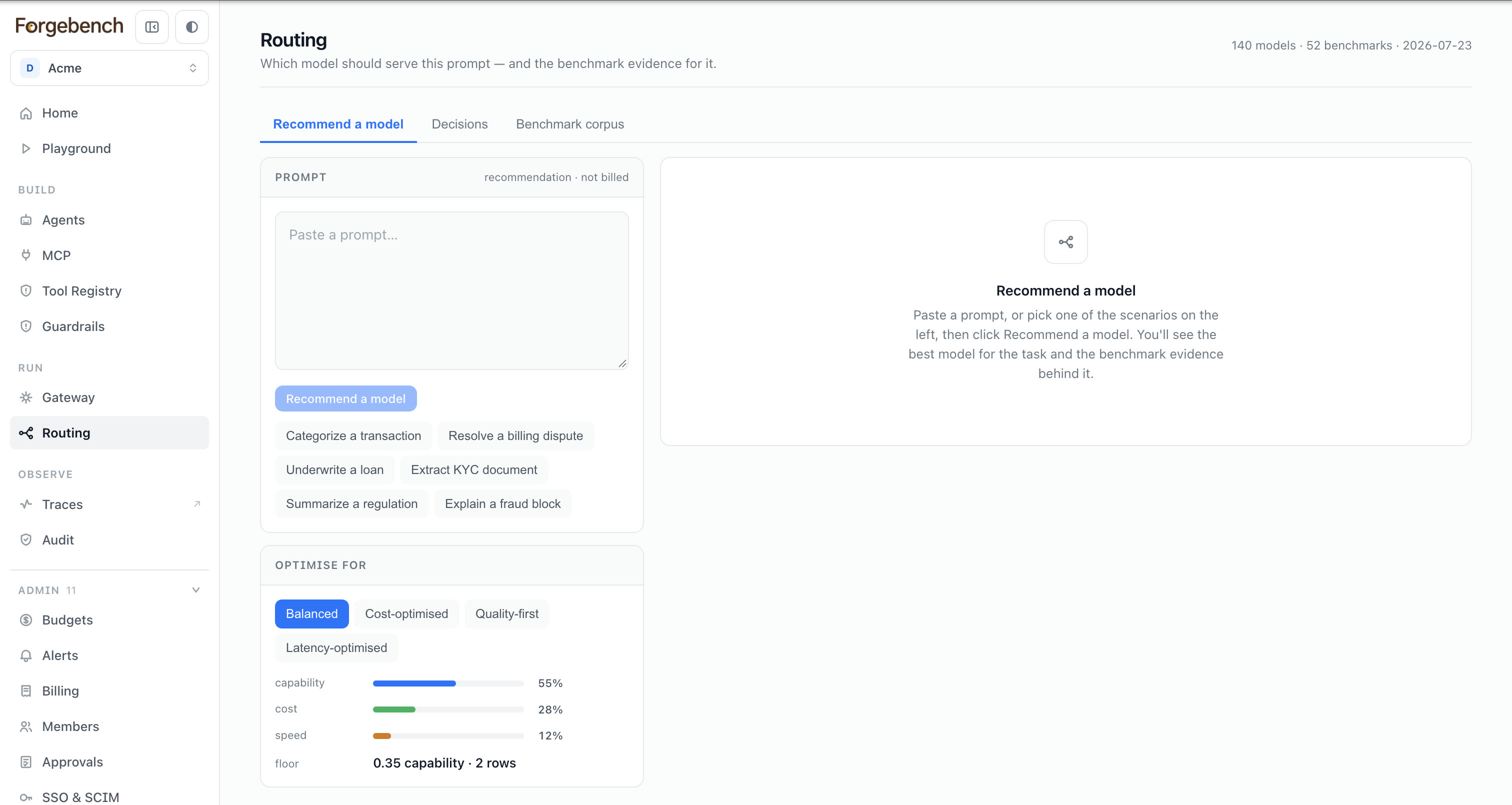
Recommend a model
Paste a prompt and pick what to optimise for (capability, cost, speed or a balanced default). You get a ranked shortlist from the whole catalog, with the task type, difficulty and the benchmark scores behind the pick. Models your workspace can't reach are marked, not hidden.
Multi-step apps
Shadow routing treats one key as one agent, so the hardest step of an app blocks savings on the rest. Register each step as its own agent with a workflow.