

Access requests
An invite is you asking a specific person to join. A request is someone asking to come in, usually after signing up with an email on your workspace's domain. A matching domain doesn't prove they belong, so nothing is granted until an owner or admin decides.
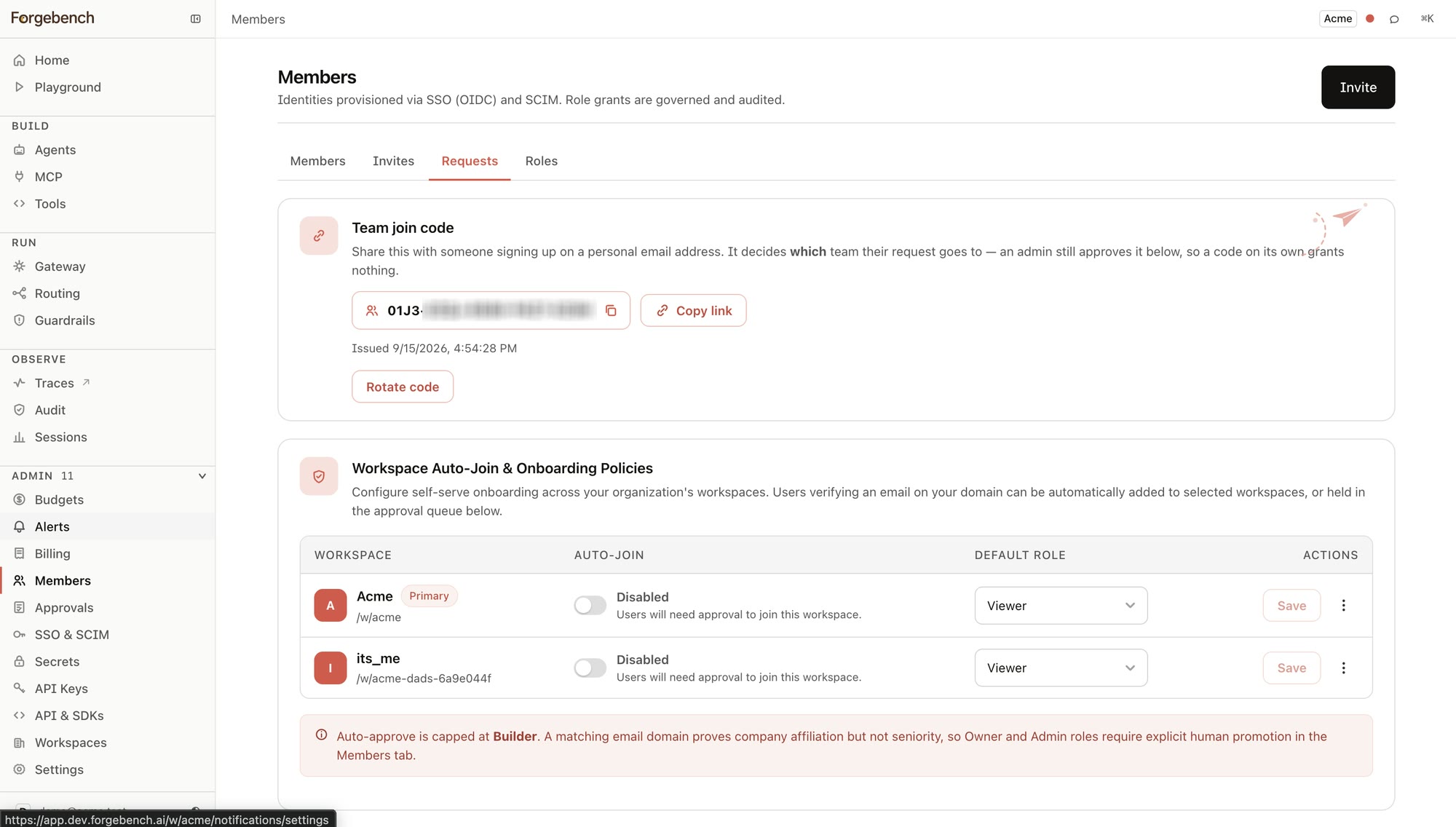
The join code
The join code is for teams that sign in with personal email addresses. Share it, and a personal-email signup that uses it lands in your approval queue.
Work emails are routed by verified domain, so a team on work email has no code here; the card shows an empty state.
Auto-join and default role
Anyone who can manage workspaces sees this table, with one row per workspace in the organization:
| Setting | What it controls |
|---|---|
| Auto-Join | On: someone who verifies an email on this workspace's domain is added without approval. Off: they go to the approval queue. |
| Default Role | The role an auto-joined member gets: viewer, builder, or a custom role from this workspace. Capped at builder. Promote to admin or owner from the Members tab. |
The approval queue
Each pending request shows who asked and when.
| Action | What happens |
|---|---|
| Deny | Closes the request. Nothing was granted. |
| Approve… | Opens a dialog to choose a system or custom role, and shows what that role carries, before anything is granted. |
Only an owner can approve someone into the owner role.