

API keys and spend
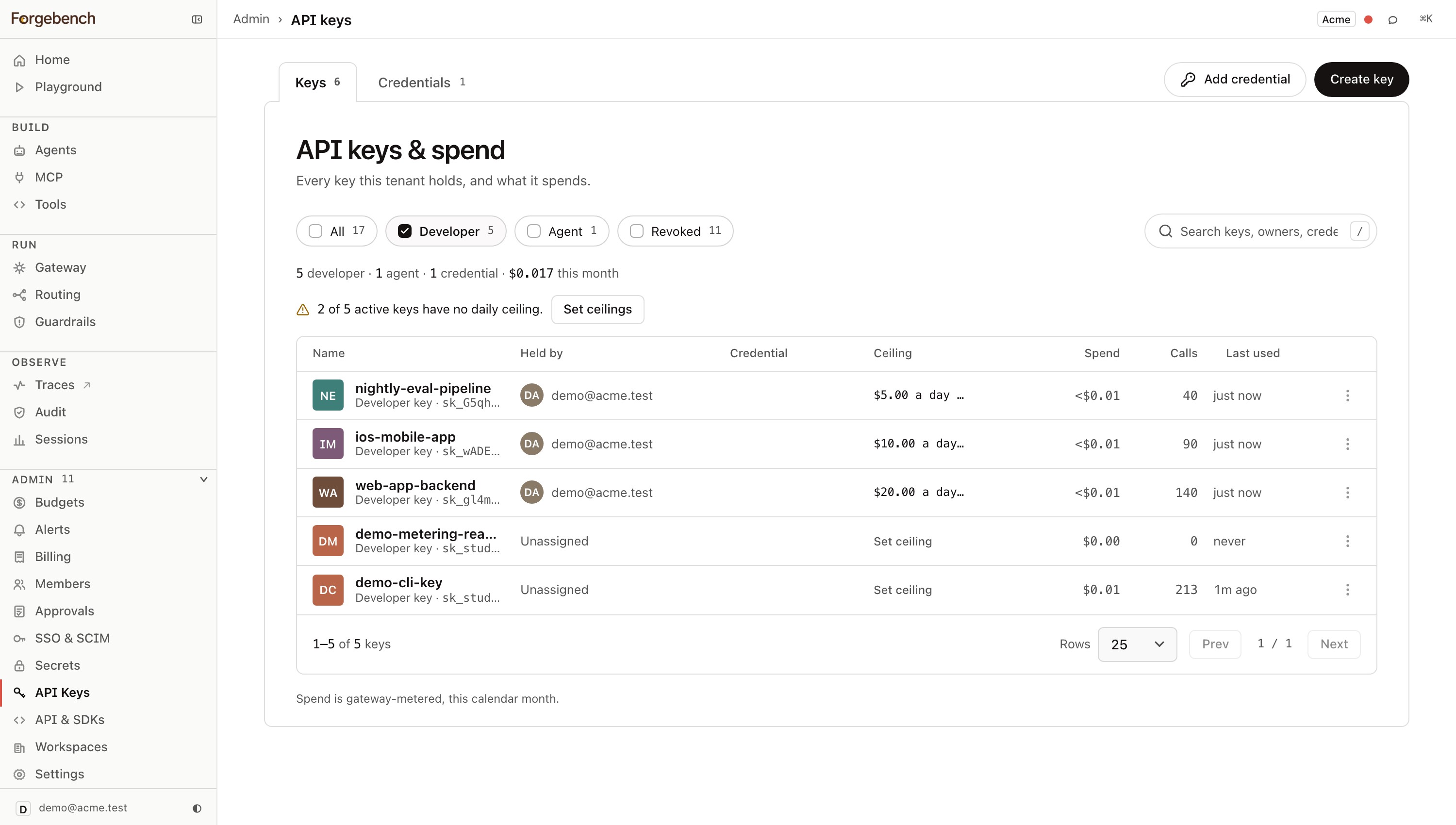
This page holds your provider credentials, the developer and agent keys issued from them, and each key's spend.
The three kinds of key
| Kind | What it is | Who holds it |
|---|---|---|
| Provider key | Your OpenAI, Anthropic, Gemini or other provider credential. Encrypted, one per provider per workspace, and added to each call by Forgebench. | Forgebench only. Your code never sees it. |
| Developer key | Issued to a person under a provider key. Its calls use that provider's credential and only that provider's models. | One developer, attributed by name. |
| Agent key | Belongs to one agent, never a person. An agent has one live key; asking for another rotates it. Rotation issues a new secret but keeps the same agent_id, so the agent's history carries over. | One Agent. |
A common setup is one provider key per provider, with a developer key per person or environment under it. Deleting a provider credential detaches its developer keys but doesn't delete them.
Provider credentials
Provider keys live on the Credentials tab. Click Add credential to open Add a provider key. The Provider list offers every provider Forgebench supports, not only those in your model catalog. See Providers for what each one needs.
Each credential's ⋯ menu has Manage models, Show its keys (its developer keys) and Delete credential.
Choose which models developers can use
Manage models sets which of a provider's models developers can call
through that credential. Anyone with secrets:view can open it; only an admin or owner can save.
- Tick the models to enable. Enable all / Disable all act on the models shown. Filter by All, Enabled or Not enabled, or search.
- A second column shows what the provider reports for that key: Available to this key or Not available to this key. For Vertex it shows whether the model is In Model Garden, linking to the model's Google Cloud page.
- Click Save. With every model enabled, models Forgebench adds later are included too; with fewer, exactly the ticked list is saved.
The list applies to the model list, key creation and every call, including keys created earlier. With nothing enabled, developers can't call any model through that credential.
Caps and scope, per key
Every developer or agent key has its own:
- Daily and monthly spend caps (USD). Blank means no cap on the key; the workspace budget still applies. Edit caps here (the key's Manage drawer) or on Budgets.
- Model allowlist. Exact match against the catalog. An empty list denies every model; no list allows every catalog model.
- Scopes. What the key may call at all.
A leaked prototype key with a $5 daily cap, one cheap model and an explicit scope list is a contained incident.
Leaving Scopes blank doesn't narrow a key. An unscoped key gets every permission of its owner. To narrow it, set an explicit, smaller scope list. A key can never carry a scope its creator doesn't hold. One exception: a member whose custom role grants keys:write can give a key chat:write so it can call models.
The owner defaults to you, but you can set any member. An unscoped key minted for a teammate can do whatever that teammate can, not what you can.
Duplicate in a key's ⋯ menu opens Create key with that key's settings filled in; choose who it is for and give it a name. Keys for other people wait until you download or share them (see below).
The secret is shown once
Mint a key
Name it, set its caps and model allowlist, and for a developer key, pick its provider key.
Copy the secret immediately
The
sk_...secret is shown once. Forgebench stores only a hash, so a lost secret can't be retrieved, only rotated.Rotate instead of losing access
Rotating issues a new secret for the same key. Its caps, scopes, allowlist and history stay the same; only your code's secret changes.
Key templates
A template saves the settings most developers need (provider credential, models, caps, rate limit and tags) so you can make keys from it without filling in the form. Admins and owners manage them; custom roles can only create keys for themselves and don't see them.
- Templates on API keys lists them, with what every key made from each one gets and how many keys were made from it. New template is at the top; Edit, Delete and Issue keys are on each template.
- Save as template in a key's ⋯ menu starts one from that key's settings.
- Editing a template updates the provider credential, models, caps, rate limit and tags of every active key made from it, straight away, and replaces changes made by hand to those keys. The editor says how many keys that is and asks once more before saving.
- Deleting a template leaves its keys working with their current settings; they just stop following it.
- Create key has a Template dropdown that fills in its form from a template. You can change anything before creating, and those keys aren't linked to the template, so editing it never changes them. People and Team there make one key each for several people, named for each person then the key name ("Ada · ci") and handed over the same way as below; leave them empty for a key for yourself.
Create keys for many people
Admins and owners can create one key for each of many people from a template. The new keys don't work, and nobody is told about them, until you choose how to hand them over.
API keys → Templates → Issue keys
Pick the template. Every key gets shows its settings.
Pick the people
Team adds everyone on a team who can hold a key; pick more teams to add them too. People is a list to tick: it shows how many keys each person already has from this template, and viewers greyed out, since they can't hold a key. Select everyone without a key ticks everyone who has none from this template yet.
Purpose (optional)
Each key is named for its person, then the template: "Ada · dev-standard". A purpose takes the template's place to tell keys apart: "Ada · ci". Someone who already has a key with that name gets a numbered one.
Create N keys
Anyone the server can't give a key to, such as a custom role without key access, is skipped and listed with the reason.
Download or share
Download keys gives you a CSV with every key's secret. The keys work straight away and nobody is notified, so pass them on yourself. You download them once; the dialog stays open and says how many were downloaded.
Share and notify sends each person an email and a notification with a link to API keys, where they reveal their own key, once. You never see the secrets, and the email doesn't contain one. It works once, also after a download: the downloaded secrets then stop working.
Someone can hold several keys from one template. On their API keys page, Reveal all shows every one of their keys waiting to be revealed at once, each secret next to its key's name.
You can close the dialog without choosing. API keys then shows the keys waiting to be handed over, with the same two choices.
Over the API:
| Method and path | What it does |
| --- | --- |
| GET /v1/key-templates | Every template, with key_count (active keys made from it). |
| POST /v1/key-templates | Save a template: name, tags, provider_key_id, allowed_models, daily_limit_usd, monthly_limit_usd, daily_token_limit, monthly_token_limit, rpm_limit. |
| PATCH /v1/key-templates/{id} | Replace a template's settings, and every active key made from it. Returns keys_updated. |
| DELETE /v1/key-templates/{id} | Delete a template. Its keys keep their settings. |
| POST /v1/key-templates/{id}/issue | identity_ids (up to 500) and an optional purpose. Returns the keys made (issued) and the people skipped, with why. |
| POST /v1/keys/issue | The key settings (name, tags, provider_key_id, allowed_models, dollar and token caps, rpm_limit) and identity_ids (up to 500). One key each, named for its person then name ("Ada · ci"), not linked to any template. Same response as above. |
| POST /v1/keys/handover | action is download or share, with the key_ids. Each works once per key: download only touches keys still waiting, share also a downloaded key nobody has used yet. Download is only allowed from a console sign-in, because the response holds the secrets. |
Spend, broken down by key
Every call is attributed to its key. You can see which developer key spent most this month, which provider key dominates the bill, and which agent key is nearest its cap. The numbers match Budgets; both read the same ledger.