

Billing
Billing shows invoices priced from the metering ledger, the record of every call that spent money. Budgets refuse calls before they spend; billing totals the calls that did. Both read the same ledger.
Read an invoice
Pick a billing month, a single day, or a date range. A day or month gets an invoice with reconciliation and a pricing snapshot. A multi-day range gets a usage summary only.
| Section | What it shows |
|---|---|
| Reconciliation | The invoice total against the ledger sum. A green "Reconciled" badge means they match. If a red alert shows, trust the ledger figure. |
| Line items | Calls, tokens and billable cost per model. The "recomputed" column re-prices the tokens at the current rate card; per-call minimums can make it differ slightly from the billed figure. |
| Daily spend | A day-by-day chart and table. Click a day to narrow the page to it. |
| Pricing snapshot | The exact rate card used for this invoice, with a unique id, so you can reproduce it later. |
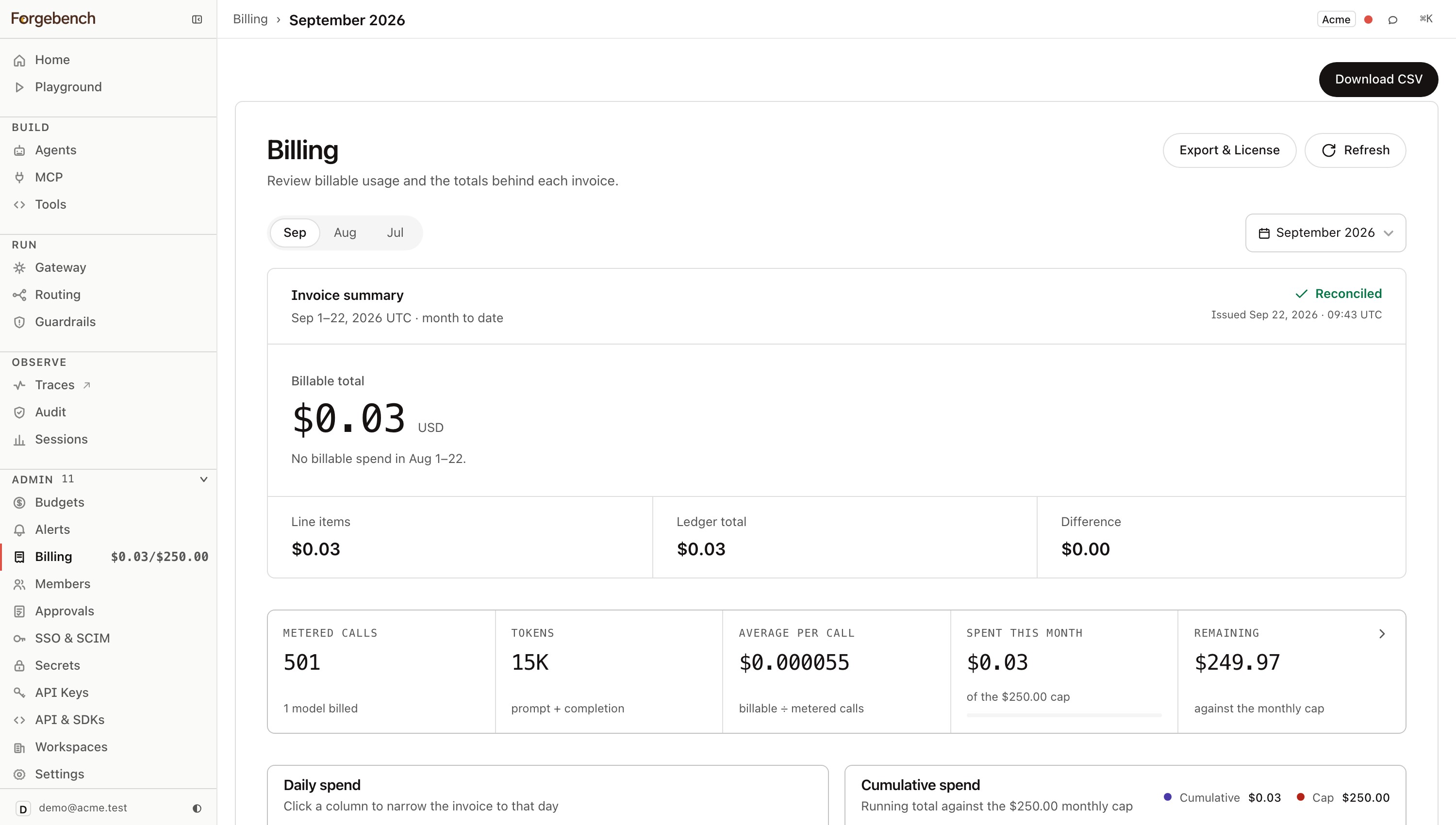
Click CSV to download the line items.
How a call is priced
Chat and embeddings calls are priced from the tokens the provider reports, at the model's rate. Image and voice models use their own units; see Gateway.
| Case | How it's billed |
|---|---|
| Long-prompt pricing | Some models charge more once the prompt passes a threshold, such as 200K tokens. Over it, the whole request (input and output) is billed at the higher rate. A prompt exactly at the threshold gets the lower rate. |
| Prompt caching | Cached prompt tokens are billed at the provider's cache read and write rates, streamed or not. |
| A model with no known price | Billed at $0.002 per 1K tokens, input and output, so it still counts against your budget. |
Your plan
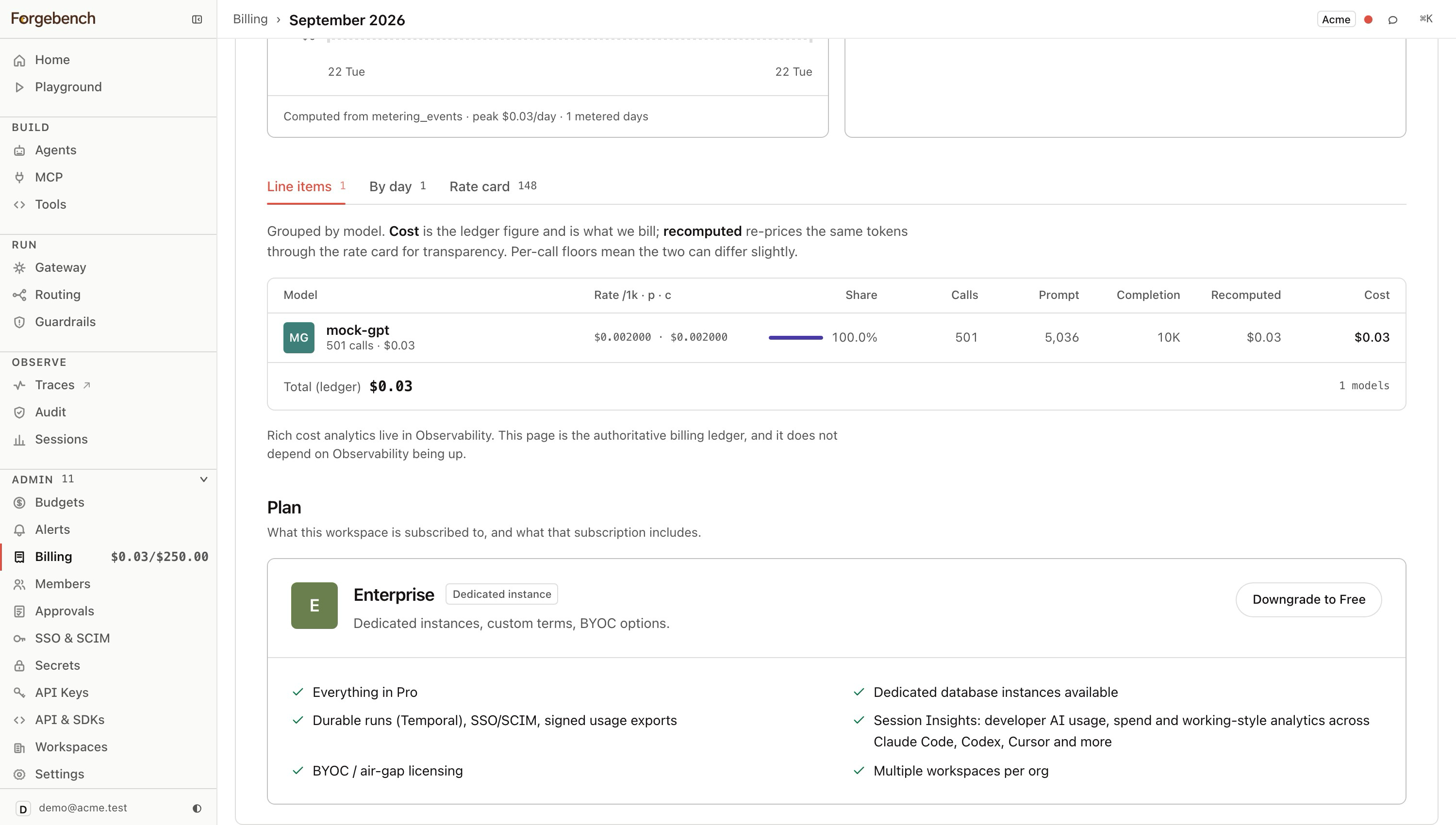
The plan card shows your tier, its price, and a button for each other self-serve plan.
| Limit / feature | Free | Pro | Enterprise |
|---|---|---|---|
| Price | $0/month | $99/month | Custom |
| Tenancy | Shared gateway and observability infrastructure | Isolated: dedicated gateway and trace storage, with their own encryption keys | Isolated, same as Pro, plus dedicated database instances available |
| Seats | 3 | 25 | Unlimited |
| Workspaces per org | 1 | 1 | Multiple |
| Default monthly budget cap | $10 | $250 | $1,000 |
| Agents | 2 | Unlimited | Unlimited |
| MCP servers | 2 | 25 | Custom |
| Governed requests/month | 10,000 | 500,000 | Custom |
| Tool calls/month | 10,000 | 1,000,000 | Custom |
| Hash-chained audit log | — | ||
| SSO | — | ||
| SCIM provisioning | — | — | |
| Approvals | — | ||
| Shared budget pools | — | ||
| Voice (Transcription, Speech Synthesis) | — | ||
| Cost / invoice reporting | — | ||
| Agent lifecycle (versioning, rollback, retire) | — | ||
| Outbound guardrails (PII/secrets/denylist scanning, auto-pause) | — | ||
| RAG and Visual Builder modules | — | ||
| Durable runs | — | — | |
| Session Insights (Claude Code, Codex, Cursor, and more) | — | — | |
| Signed usage exports | — | — | |
| BYOC / air-gapped deployment | — | — |
These limits are enforced. Hitting a numeric limit returns 402. A page your plan doesn't include, such as Approvals on Free, shows a lock card naming the cheapest plan that has it, with nothing visible behind it.
Upgrade
Open Billing
Each higher self-serve plan has a button:
Upgrade to <plan> — $<price>/mo.Complete Stripe Checkout
Back on Billing, a banner reads
Payment received — your plan is being activated.The plan card and unlocked pages update once payment is confirmed.
To update a card or see past invoices on a paid plan, click Manage billing to open the Stripe customer portal.
Downgrade
Click Downgrade to Free on the plan card. The change applies right away.
Free and Pro allow one active workspace. If you have more, your primary workspace stays active and the others freeze immediately. Frozen workspaces are read-only, not deleted: they stay in every list marked read-only, with their data, agents and logs kept. Moving back to a plan with multiple workspaces unfreezes them.
Export & License
When Forgebench runs in your own cluster (BYOC or air-gapped), billing leaves as a signed document and the license is verified locally. Open Export & License from the Billing page:
| Block | What it is |
|---|---|
| License | An Ed25519-signed entitlement, verified offline: tier, caps and remaining headroom. Anything shown red here returns 402 on calls. |
| Signed usage report | A month's usage total, anchored to the audit hash chain (sequence range, head hash and Merkle root) and signed by the deployment's key. Altering any call changes the Merkle root, so tampering is detectable. |
| True-up | Licensed allowance, metered usage, overage and total due: what's billed on top of the flat tier. |
Anyone receiving the report can verify its signature against the deployment's public key, shown on this page.